
How to Remove Domain Name from cPanel
When you no longer want to continue the domain name, you have the option to remove/delete it from cPanel.
Here are the steps that you will have to follow to remove/delete the domain name from cPanel.
1. Login to your cPanel with username and password.
2. Go to the Domains section.
You will get to see a list of domains associated with your hosting account.
3. From the list, click on the Domain that you want to remove and then, click on Manage.
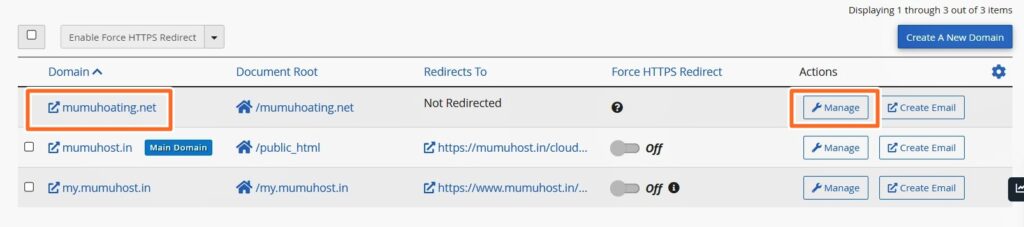
You’ll now see a list of domain names associated with your hosting account.
4. Then, finally click on the Remove Domain option.
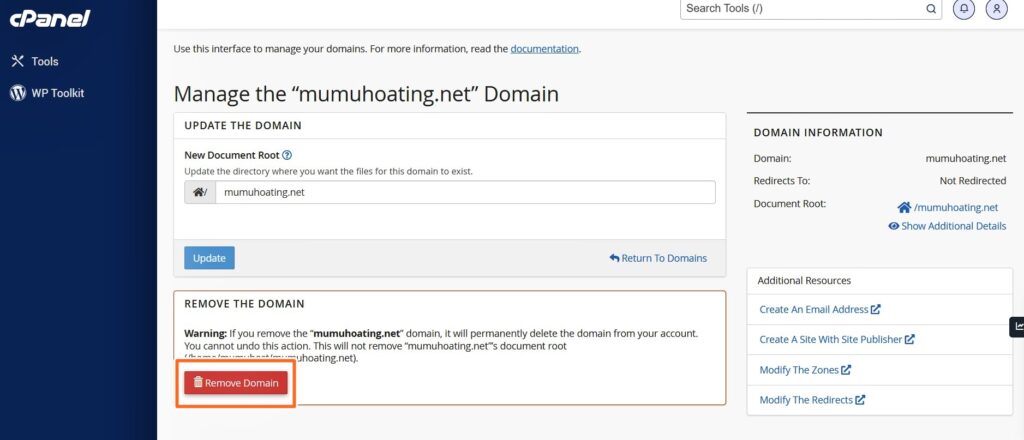
This is how you can remove the domain name from your web hosting account.
Hope this article was helpful! And, I believe you have learned how to remove domain name from cPanel account.